Features Labels Pricing Support About Contact
Home Features Timesheets

Comprehensive
Time Tracking

Timesheet management with QR clock-in/out, mobile and web submission, approval workflows, four entry types, parts consumption tracking, and employee rewards integration — all connected to your jobs and inventory.

3
Submission Methods
4
Entry Types
QR
Clock In / Out
+
Rewards Integration
Submission Methods

Three Ways to Submit Time

Whether your team is on the job site with a phone, scanning a QR code at arrival, or managing from the office — AXITRAQ captures every hour accurately.

1

Mobile App

Full-featured native submission with date picker, job selector, start/end time pickers with 5-minute intervals, entry type selection, parts tracking, notes, and passive GPS recording.

2

QR Code Clock-In/Out

Scan the job site QR code with the AXITRAQ app to clock in. Scan again to clock out. Original scan timestamps preserved separately with full audit trail for any adjustments.

3

Web Dashboard

Web-based timesheet submission and management for office teams. View all employee timesheets, approve or reject entries, and manage time records from the dashboard.

Entry Types

Four Entry Types for Every Scenario

Categorise every timesheet entry as Regular, Overtime, Travel, or Standby. Each type is tracked separately in reports and summaries, giving you a clear breakdown of how your workforce spends its time.

  • Regular — Standard working hours
  • Overtime — Hours beyond standard allocation
  • Travel — Travel time to and from job sites
  • Standby — On-call or standby hours
AXITRAQ Employee Timesheet
Approval Workflow

Submit. Review. Approve.

Every timesheet follows a clear workflow: Submitted → Pending Approval → Approved or Rejected. Managers can approve, reject with notes, or adjust times — with every change tracked in a full audit trail.

  • Approve, reject, or adjust with a single click
  • Rejection notes communicated back to the employee
  • All time adjustments logged in the audit trail
  • Original QR scan times preserved vs. recorded times
AXITRAQ Timesheet Approval Workflow
Viewing Timesheets

Multiple Views for Every Role

Access timesheet data from three different perspectives — by job, by employee, or across the entire company. Each view includes detail modals with scanned vs. recorded times, GPS data, and adjustment history.

Job Timesheets Tab

All entries for a specific job with employee names, hours, QR vs. manual indicator, and status badges

Employee Timesheets Tab

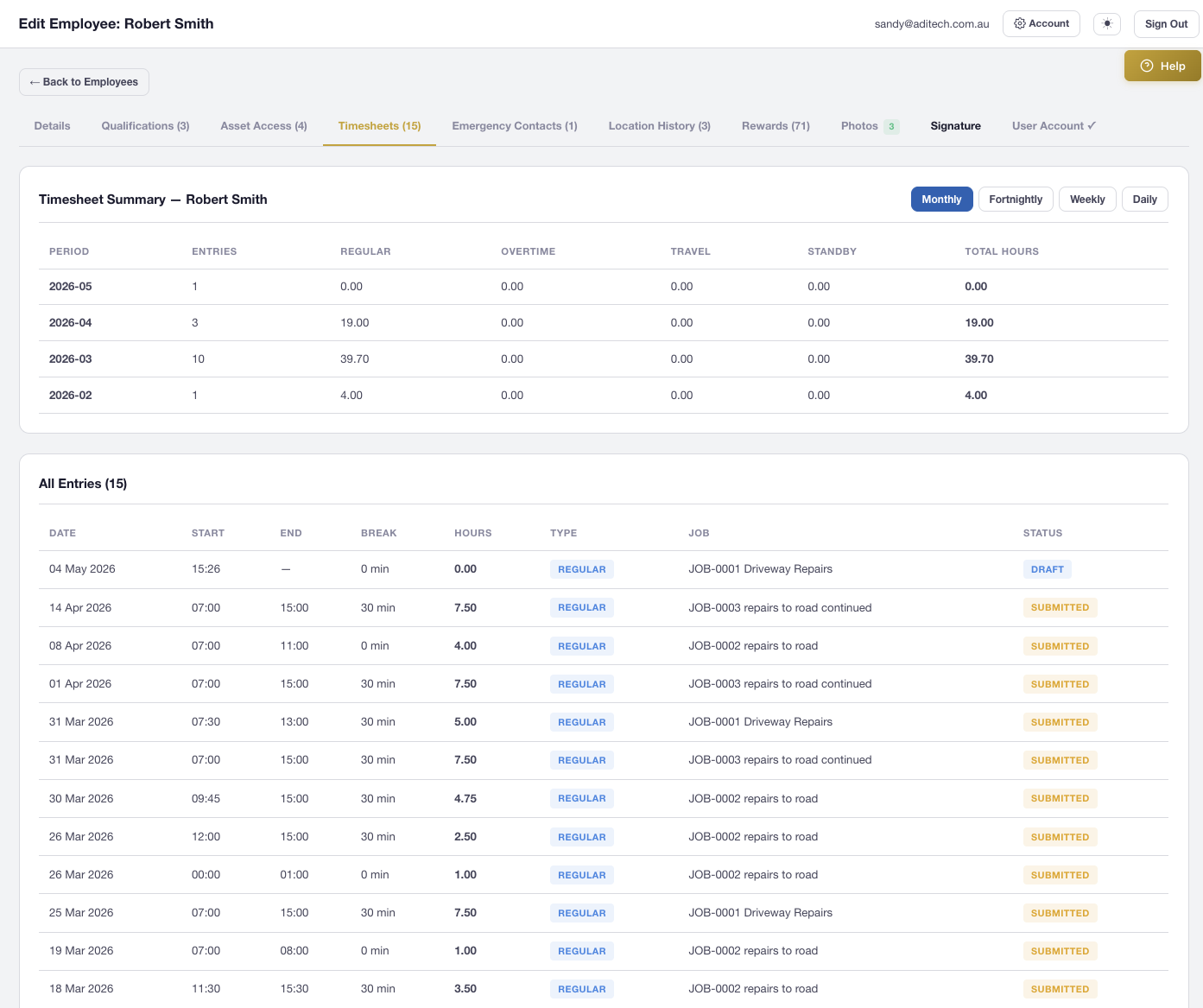
Full entry list with job reference, hours, type, status, and summary view with daily/weekly/fortnightly/monthly grouping

Management Page

Central view of all company timesheets, filterable by employee, job, date range, and status with bulk approve/reject

Detail Modal

Scanned vs. recorded times, GPS data with map, adjustment history, and direct link to edit

Summary Grouping

Daily, weekly, fortnightly, and monthly breakdowns with totals by entry type

Hours Report

Regular, overtime, travel, and standby hours with daily averages and jobs worked count

Parts & Materials Tracking

Log Parts Consumption with Every Entry

When submitting timesheets, employees can log the parts and materials they used on the job. A searchable parts list from company inventory makes selection fast, with quantity and notes per item.

  • Searchable parts list from your company inventory
  • Quantity and notes per item consumed
  • Linked to timesheet entries for full traceability
  • Resilient submission — parts errors never block the timesheet
AXITRAQ Parts and Materials Tracking
Employee Rewards

Incentivise Timely Submissions

Timesheet submission automatically triggers the employee rewards system. On-time submissions earn points, while late submissions result in deductions. Deadlines are configurable per company, and reward points are visible on the mobile app dashboard.

  • +5 points for on-time submission
  • −10 points for late submission
  • Configurable deadline hours per company
  • Points visible on mobile dashboard and rewards tab
AXITRAQ Employee Rewards Integration
Daily Working Hours

Company Defaults. Per-Job Overrides.

Set default working hours in company settings, then override them per job when needed. Each job supports a per-day schedule grid with individual day overrides, and multi-day jobs automatically split into daily segments on the calendar.

  • Company-wide default start and end times
  • Per-job custom daily start/end time overrides
  • Per-day schedule grid for individual day control
  • Multi-day jobs split into daily calendar segments
AXITRAQ Daily Working Hours
Mobile & REST API

Full API Coverage for Timesheets

Every timesheet operation is available through dedicated mobile API endpoints and the versioned REST API. Submit, list, approve, reject, clock in, clock out, and pull summary statistics — all programmatically.

  • 10 dedicated mobile API endpoints for timesheet operations
  • REST API v1 with pagination, filtering by date/employee/job/status
  • QR clock-in/out via job_clock_in and job_clock_out endpoints
  • Requires timesheets:read API key scope for security
AXITRAQ Timesheet API

Ready to Streamline
Your Timesheets?

Start your 30-day free trial and see how AXITRAQ transforms time tracking with QR codes, mobile submission, and automated approvals.